
How to Do Effective Video Prospecting
By Ryane Tully · March 13, 2024

Video prospecting means using a short, relevant video in sales outreach to show why you are contacting a specific buyer and what they should do next. Using video for sales prospecting works best when the visual adds useful context, the email explains the point in writing, and the team measures replies and pipeline—not views alone.
Helpful summary
- Use video when showing an account-specific observation is clearer than describing it in text.
- Match the format to the outreach moment: first touch, engaged-prospect follow-up, or account-specific walkthrough.
- Build the message around context, observation, value, and one next step.
- Keep the video and its email wrapper as separate assets; each should make sense without the other.
- Track delivery, video engagement, replies, meetings, and pipeline in the systems that own those signals.
- Pitchlane is a fit when you want to record your pitch once, personalize for every lead and push the results into tools such as Instantly, Smartlead, lemlist, HubSpot, or Apollo.
What is video prospecting?
Video prospecting, also called video sales prospecting, is the use of short video messages in outbound sales. A rep might send a webcam introduction, screen walkthrough, account audit, or personalized landing-page video by email, LinkedIn, or a sales sequence. The video should make the reason for contacting the account easier to understand; it should not turn a simple message into extra work for the buyer.
Video prospecting differs from broad video marketing because it targets a defined account or buyer within a sales motion. Video marketing usually addresses an audience rather than one prospect or account segment.
When should you use video instead of text-only outreach?
Use video when visual context materially improves the message:
- You can show a prospect’s website, product, ad, job post, or workflow.
- The account is important enough to justify deeper research and personalization.
- A previous email was opened or clicked but did not receive a reply.
- Your product or observation is easier to understand on screen.
- An account-based campaign needs more specificity than a reusable text sequence can provide.
Use text when the message is simple, the account fit is low, the prospect has not been researched, or the video would repeat the email word for word. Video is also the wrong format for essential information that the recipient must be able to scan, save, or access without pressing play.
Video prospecting examples by outreach moment
The same video should not be reused for every stage. Choose the format based on what the prospect already knows and what the next message needs to accomplish.
First-touch introduction
Use a short webcam or screen-recorded video to explain why the account is relevant. Lead with one public trigger or account observation, connect it to one problem, and ask for one next step. Do not spend the opening on a company biography.
Follow-up after engagement
If a prospect opened, clicked, viewed a page, or engaged with an earlier message, use a follow-up video to continue the same thread. Add one useful detail or answer a likely question rather than restarting the original pitch. Treat engagement as a follow-up signal, not proof of interest or intent.
Account-specific walkthrough
Use screen recording when the buyer needs to see something: a website observation, campaign idea, workflow issue, or short audit. This format suits higher-value accounts where the observation is specific enough to justify the recipient’s time.
How to do video prospecting in 8 steps
A useful workflow moves from account selection to measurement without creating separate production and follow-up processes.
1. Research the account and buyer
Find the trigger that explains why you are reaching out now: a new role, public initiative, workflow change, relevant page, or another reviewed account signal. Save one useful detail for the opening line. Do not use sensitive personal information or manufacture familiarity.
2. Choose the outreach moment and format
Decide whether this is a first touch, a follow-up, or an account-specific walkthrough. Then choose webcam, screen recording, a combined format, or a personalized landing-page video. If a visual does not improve the message, send text instead.
3. Write the video and email separately
Use the same core idea in both assets, but give each a distinct job. The video shows or explains the observation. The email identifies the sender, states why the message matters, and gives the next step without requiring playback.
4. Record or generate the video
Keep the production simple: clear audio, a readable screen, and no long setup. Teams sending at scale can use Pitchlane’s record your pitch once, personalize for every lead model instead of recording every asset from scratch.
5. Personalize and review the supporting assets
Check the email copy, subject line, thumbnail, landing page, title, variables, destination, and CTA. Pitchlane’s documented campaign setup proceeds through Import Leads, Customize Landing Page, and Review Test Video before results are handed into a connected outreach workflow. Review representative output and exceptions before launch.
6. Send through the appropriate channel
Use the channel where the prospect can reasonably respond. Email suits structured sequences; LinkedIn may suit relationship-led outreach. Keep sender setup, timing, delivery, replies, and suppression logic in the approved outreach or mailbox system.
7. Follow up from the full signal set
A complete view with no reply calls for a different follow-up from no view, but neither proves buying intent. Refer back to the account reason and add useful context. Do not send a message that merely announces that the prospect was tracked.
8. Measure and improve one variable at a time
Compare the hook, audience, format, or CTA separately. Keep video events in the video layer, email events in the sending platform, and opportunity outcomes in the CRM or system of record so the team does not confuse attention with pipeline.
Video prospecting script template
Use this as a short starting point, then remove any line that could be sent unchanged to every account:
Hi {{first_name}}, I noticed {{specific_company_trigger}} and thought this might be relevant because {{pain_or_goal}}.
I recorded this to show {{one_specific_observation_or_idea}}.
The short version: {{your_offer}} helps teams {{outcome}} without {{common_problem}}.
If this is worth exploring, would you be open to {{clear_next_step}}?
The structure is context, observation, value, and CTA. The script should sound like one person speaking to one account, even when the production workflow reuses a base recording for a coherent segment.
Video prospecting email template
The email wrapper should explain the message before the prospect clicks:
Subject: quick idea for {{company}}
Hi {{first_name}},
I noticed {{specific_trigger}} and recorded a short video with one idea for {{company}}:
{{video_link}}
The short version: {{one_sentence_value}}.
Worth a quick conversation next week?
{{sender_name}}
Keep essential context and the CTA in writing. A thumbnail or link without an explanation asks the prospect to spend time before they know why the message matters.
Where do AI and video prospecting tools fit?
Tools can assist with research, drafting, creation or personalization, review, hosting, handoff, and measurement. They do not remove the need to verify account data, approve the segment and base message, inspect test output, or decide which system owns replies and pipeline outcomes.
Most teams need several layers:
| Layer | Primary job | Control to keep |
|---|---|---|
| Prospect data | Select accounts and provide accurate variables | Verify source, relevance, and permitted use |
| Video creation or personalization | Produce the video and hosted experience | Review the base message and representative output |
| Outreach tool or mailbox | Control sender setup, sequence timing, delivery, and replies | Keep suppression and channel rules here |
| CRM or system of record | Own contacts, opportunities, follow-up, and business outcomes | Define attribution before launch |
For a tool-by-tool comparison, read the video prospecting tools guide. Pitchlane covers the personalized-video layer and pushes into supported outreach and CRM workflows, including HubSpot, Salesforce, Close, and Apollo.
Which video prospecting metrics should you track?
Measure the full path from message delivery to pipeline. A high view count can still produce no useful conversations, while a low-volume account segment may matter if it creates qualified meetings.
- Delivery: whether the message was accepted by the inbox or platform.
- Email engagement: opens and clicks where the sending system provides them.
- Video engagement: views, unique viewers, watch time, and completion where available.
- Conversation: replies, positive replies, objections, and referrals.
- Pipeline: meetings booked, opportunities created, and deal-stage movement.
- Operations: creation time, exception rate, time to send, and follow-up completion.
Assign each signal to its source before the campaign starts. Do not treat a view as evidence of buyer quality, seriousness, or fit.
Video prospecting best practices and failure modes
Good video prospecting is specific, easy to understand without playback, and connected to a defined follow-up process. The most common failures are operational rather than cinematic:
- Recording a generic video and calling it personalized.
- Spending the opening on the sender instead of the account reason.
- Sending a video with no written context or accessible alternative.
- Using a vague CTA such as “let me know what you think.”
- Changing the audience, hook, format, and CTA at the same time.
- Treating view data as proof of intent.
- Making claims that sales or marketing cannot substantiate.
- Letting personalization, sending, and CRM systems disagree about ownership of a signal.
Can recruiters use video for candidate outreach?
Yes, when the video is a short, optional recruiter-to-candidate message rather than a recruitment film or video interview. Recruitment video outreach is most appropriate when a recruiter has a specific, job-related reason to contact someone and keeps the role facts, next step, and communication options in writing as well as video.
This section provides operational examples, not legal advice. Employment, privacy, accessibility, electronic-communications, recordkeeping, and accommodation duties vary by country, state, role, and channel. The recruiting organization must identify the rules that apply to its campaign and have its legal, privacy, HR, and accessibility owners approve the process.
Recruitment video outreach vs recruitment marketing vs video interviews
These formats involve different recipients, purposes, and safeguards. On a narrow screen, scroll the table horizontally.
| Format | Who communicates with whom? | What the video does | What it is not |
|---|---|---|---|
| Recruitment video outreach | Recruiter to a potential or active candidate | Introduces a relevant role, adds context, or explains a next step | A screening or assessment |
| Recruitment marketing | Employer to a broad candidate audience | Presents a team, workplace, role family, or employer brand | One-to-one candidate outreach |
| Video interview | Candidate to an employer or interview panel | Records or supports a candidate response | A prospecting message |
“Recruiting video” can also mean an athlete highlight reel or a student-enrollment video. Here, it means a recruiter-to-candidate message. Staffing agencies may also use video to contact hiring clients, but that is commercial prospecting and should be managed separately from candidate communication.
Where can video fit in the recruiting process?
The recruiting stage should determine whether a video helps and what must stay in text. On a narrow screen, scroll the table horizontally.
| Recruiting stage | Useful role for video | Keep in writing | Main caution |
|---|---|---|---|
| Passive sourcing | Explain the role and one job-relevant reason for contacting the person | Role facts, sender identity, next step, and a way to decline | Do not include sensitive inferences or unrelated personal details |
| Follow-up after interest | Add one useful update or introduce the hiring manager or process | The promised material, action, and deadline | Do not rely on the candidate having played the video |
| Interview reminder | Add optional human context or preparation guidance | Date, time zone, format, participants, rescheduling, and accommodation route | Video must not replace accessible logistics |
| Re-engagement | Explain what has materially changed since prior contact | The new role details and communication options | Respect preferences and suppression records in the system that owns them |
| Staffing-agency client development | Share a hiring-market observation or sourcing approach with a prospective client | The commercial offer and next step | Treat it as sales outreach, not candidate outreach |
As an operational default, keep sensitive decisions in the organization’s approved human process and durable written record. A prospecting video is a poor channel for a rejection, medical or accommodation information, compensation negotiation, or another decision that materially affects the candidate. Whether a particular written record or accommodation is legally required depends on the applicable jurisdiction and process.
What should a recruiter say in a candidate outreach video?
Use four parts: context, specific relevance, role value, and a low-pressure next step. Base the relevance on appropriate, reviewed information rather than assumptions about the person’s identity or circumstances.
For passive sourcing, a message could follow this structure:
Hi [first name], I’m [recruiter name] from [company]. I’m contacting you about the [role] position because [job-related reason]. I recorded a short introduction to the team and the work. The essential details are also in this message. If it may be relevant, would you prefer the full description or a brief conversation?
For re-engagement, lead with the material change rather than pretending this is a first contact:
Hi [first name], we spoke previously about [role or team]. I’m reaching out again because [scope, location, seniority, or timing] has changed. I included the updated details in writing. If the new version is relevant, you can reply here; if not, let me know how you would prefer us to handle future contact.
A staffing agency contacting a hiring client needs a different script:
Hi [name], I noticed [approved account or hiring trigger]. We are seeing [specific role-market observation] for teams hiring [role type]. I recorded one idea for [hiring problem]. Would a short discussion about [defined next step] be useful?
Do not manufacture familiarity or imply that a reusable video was recorded uniquely for each recipient. If a person needs the video in another format, make the same useful information available without requiring playback.
Candidate outreach video checklist
The applicable law comes first. The following are conservative operational defaults for a team to take through its own legal, privacy, HR, and accessibility review:
- Establish and document the purpose, lawful basis or other required authority, notices, channel rules, retention period, and candidate-rights process for the jurisdictions involved.
- Minimize campaign fields to what the defined purpose needs. Avoid protected-characteristic references, medical or family information, and personal details unrelated to the job.
- Segment by a legitimate message need, not assumptions about identity, background, circumstances, or “culture fit.”
- Keep suppression, prior-contact, preference, retention, and candidate-history records in the system that owns them.
- Require a human to review the base message, variables, landing page, and representative test output before launch.
- Provide accurate captions or a transcript, and repeat essential role facts, dates, actions, and contact routes in accessible text.
- Make it easy to decline, request another format, or state a communication preference.
- Treat clicks and video views as communication signals, not evidence of candidate quality, motivation, seriousness, or fit.
Primary guidance reviewed 19 September 2026: the UK Information Commissioner’s Office’s draft recruitment and selection guidance covers employers, agencies, head-hunters, and consultancies, warns that candidate information may be sensitive, and explicitly separates legislative “must” requirements from “should” and “could” good practice. Its data-minimisation guidance says UK GDPR data should be adequate, relevant, and limited to what is necessary; the ICO notes that the recruitment draft and related guidance are under review. In the United States, the EEOC’s Prohibited Employment Policies/Practices page, reviewed 19 September 2026, says recruitment may not discriminate on protected grounds and advises limiting pre-employment inquiries to information essential to job qualification. For media accessibility, W3C WAI’s Captions/Subtitles resource, reviewed 19 September 2026, explains that captions convey the speech and non-speech audio needed to understand video. These sources cover specific jurisdictions or technical guidance; they are not a universal compliance checklist.
Pitchlane’s privacy policy explains Pitchlane’s own practices. It does not establish whether a recruiting campaign complies with an employer’s obligations or a candidate’s communication preferences.
How can Pitchlane fit a recruiter outreach workflow?
A recruiting team could adapt Pitchlane’s record your pitch once, personalize for every lead model for a carefully segmented campaign. After one reusable recording, the documented setup proceeds through Import Leads, Customize Landing Page, and Review Test Video before the results are handed into a connected outreach workflow.
The approved recipient list, permission model, suppression rules, candidate history, sending, and hiring-stage records should remain in the systems and processes the team already uses. Pitchlane is not presented here as an ATS, sourcing database, interview platform, or hiring-decision system.
Pitchlane pushes into supported outreach and CRM workflows, including HubSpot, Salesforce, Close, and Apollo. These are workflow handoffs, not claims of native ATS support. Teams comparing the personalized-video layer can also review the video prospecting tools guide or explore Pitchlane.
What did a documented Pitchlane workflow test show?
Pitchlane’s 29 August 2026 editorial workflow test used a real 83-row outbound import: 82 rows were accepted and one was rejected for a data error. The result is documented in the Pitchlane vs Loom workflow, including the reusable-script step and the import-result capture. It demonstrates two practical controls relevant to a recruiting adaptation: write one recording for a coherent segment, then inspect rejected rows and representative test output before processing a batch.
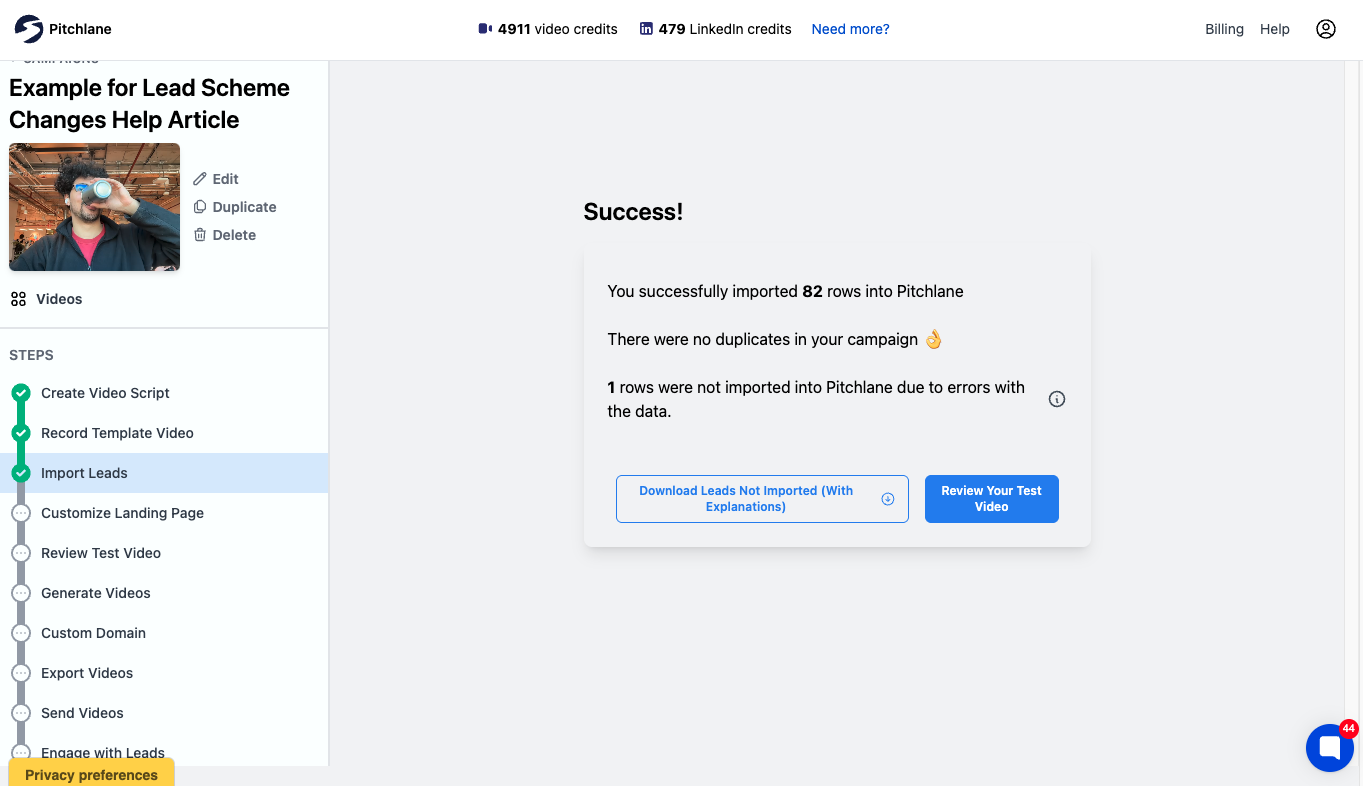
For a recruiter-specific dry run, use fictional records first and map only the fields the message actually needs. On a narrow screen, scroll the table horizontally.
| Example field | Use in the workflow | Do not put here |
|---|---|---|
| First name | Written greeting or landing-page context | Guessed identity information |
| Role title | State the specific opening | Inferred seniority or suitability |
| Job-related reason | Explain why this role may be relevant | Health, family, age, ethnicity, or other sensitive inference |
| Role URL | Give the candidate a durable source for details | A tracking URL that hides the destination |
| Reply or preference route | Let the recipient respond, decline, or request another format | A forced video-only next step |
Limitations: the pictured import was a general outbound test, not a recruiter campaign; it used no candidate data, sent no recruitment messages, and measured no candidate outcomes. The fictional field map is an editorial test of the proposed workflow, not evidence that a recruiting team has adopted it or that it complies in any jurisdiction. A recruiting organization still needs its own representative-data test, approvals, accessibility check, and sending-system controls.
Take the next step
Choose one account segment and one outreach moment. Write the video and email wrapper, define which systems own delivery, views, replies, and pipeline, then test the workflow on representative records before expanding it.